
Know what you used—and what to buy next.
Save your supplies and purchase costs. Record what a job used, then check stock and estimated supply costs in the same workspace.
Try it free for 14 daysNo card needed. Works on your phone and computer.
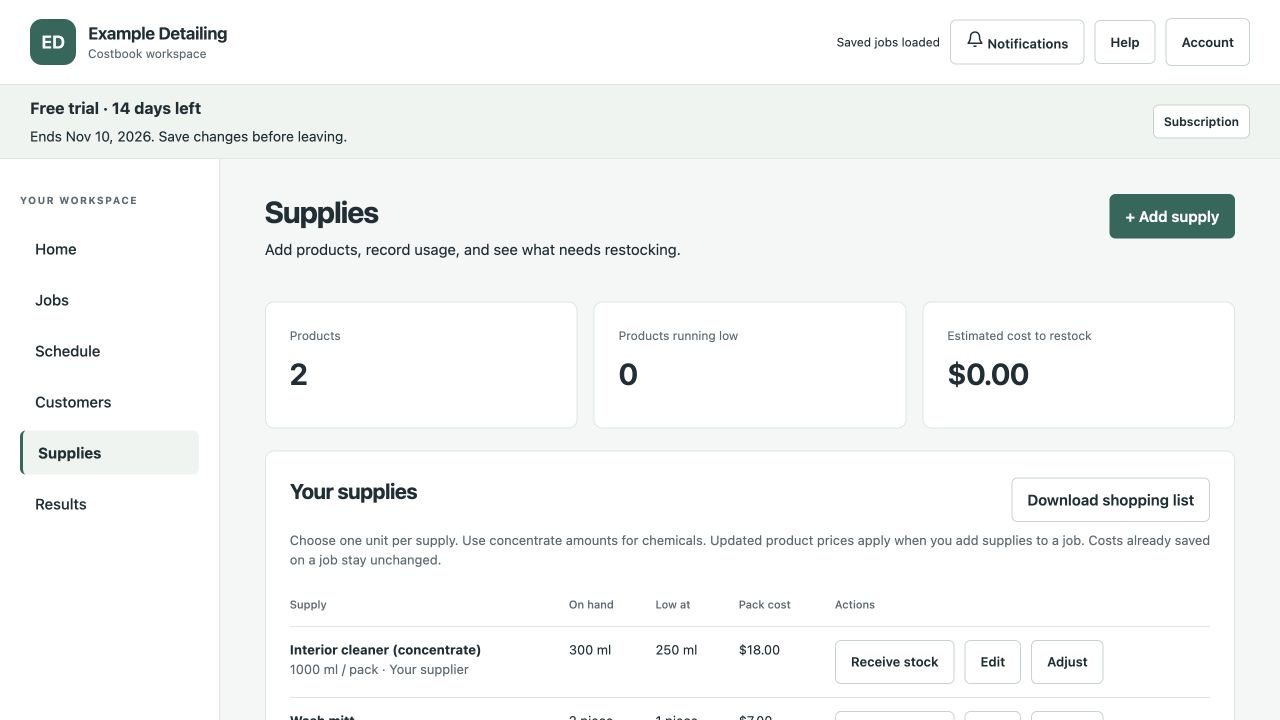
You do not have to measure every millilitre
Choose the unit that fits the product. Record an exact amount, a percentage or a fraction such as a quarter or half of the saved container size.
For tinting, you can track film by area or length and include waste. Use consistent units so the cost calculation makes sense.
- Add the supply. Enter its container size, purchase price and stock on hand.
- Add usage to a job. Choose the product and how much the work used.
- Complete the job. Costbook deducts the recorded usage once. Reopening the job reverses that deduction.
- Review low stock. Set a reorder point and target stock level for each supply.
A shopping list when stock runs low
Costbook shows the supplies at or below their reorder point and estimates how many packs you need. Save a supplier link to open the product page.
You choose the supplier, check current prices and place the order. When it arrives, record the stock received.
See the cost of each job
Recorded product usage feeds into the job’s cost. Compare those costs with the time worked and selling price to review the result.
Stock depends on the usage and deliveries you record. Costbook does not connect to supplier inventory or place orders automatically.
See a window-tinting cost exampleCommon questions
Can I use fractions or percentages?
Yes. Choose the saved container as the basis, then enter the portion used. Check the resulting quantity before saving it to the job.
Will supply purchases be counted twice?
Job reports use the cost of the quantity used on the job. Avoid adding the same purchase again as a shared expense.
Try it with your own jobs
Use Costbook free for 14 days. Add your business details and create your first estimate. No card needed.
Start your free trial